Overwhelmed By AI? Sign Up for Viktor Now.
I’ve been testing a lot of AI tools over the past year. ChatGPT, Claude, Replit Agent — I’ve built entire apps with AI without writing a line of code.
But recently I started working with something different. My mate Jared from Connected PE told me about this agent Viktor he’s been working with. Not just a chatbot to questions of, but an actual AI coworker that sits in Slack and works with him back and forth all day.
My first reaction was the same reaction I’ve seen from a lot of people, which is to say ‘I’m not sure what I’d use it for’. Jarrod suggested I just sign up and ask him what I should use him for.
So I did and my goodness, is my mind blow. The following article is some of the work we’ve done together this week, just working back and forth for a few hours a day across my various projects.
What Is Viktor?
Viktor is an autonomous AI coworker. He lives in Slack, has his own workspace, and can connect to the tools I already use — WordPress, Mailchimp, Canva, Google Drive, even custom apps I’ve built. I didn’t even use Slack anymore, but I made the call to sign for a free account just to try Viktor.
Viktor doesn’t just answer questions. He writes scripts, runs them, checks the results, iterates, and delivers finished work. Think of it less like talking to ChatGPT and more like onboarding a new team member who happens to work 24/7 and never forgets anything.
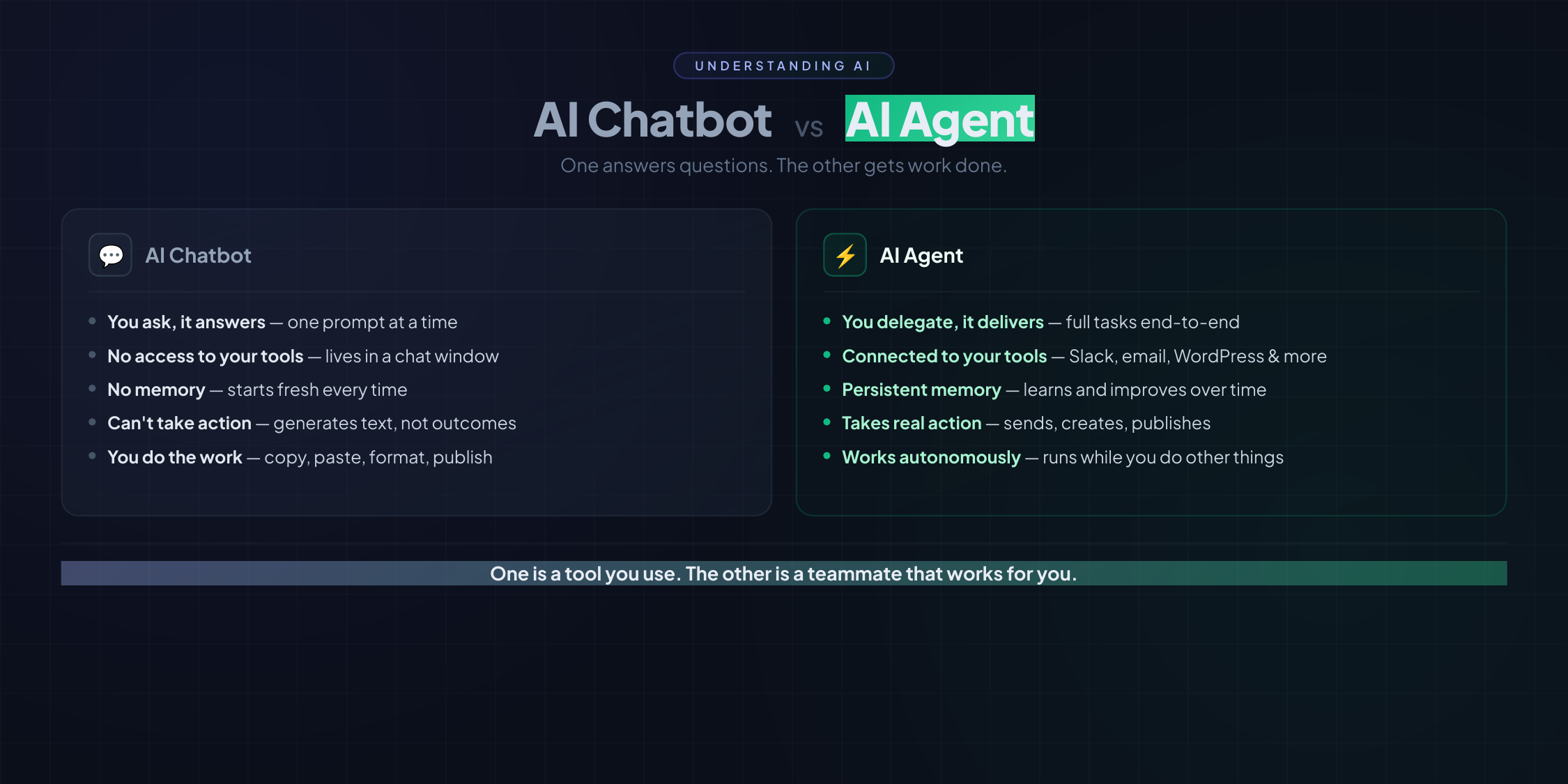
Someone asked me recently, “What even is an AI agent?” — I had Viktor make an infographic explaining the difference between a chatbot and an agent. He designed it, built it, and delivered it as a PDF. That kind of sums it up.
What We’ve Done Together (So Far)
I’ve only been working with Viktor for a week and honestly, the amount we’ve gotten through is ridiculous. Here’s a rundown.
1. The AI Grief Journey Infographic
I had a fun content idea: “The 5 Stages of Realizing an AI Can Do Your Job Better Than You Can” — based on the 5 stages of grief, featuring real quotes from real tech leaders.
I messaged Viktor with the concept. He went away and did hours of research — found actual tweets and quotes from DHH, the creator of Ruby on Rails (who went from calling AI “too dumb” to saying it’s “the most exciting thing since the internet” in 6 months), the Zoho CEO, the NVIDIA CEO, Shopify’s Tobi Lütke, Pieter Levels, and dozens of others.
He sent me options for each stage with sources and let me pick. Then he designed the entire infographic from scratch — multiple versions for social media, blog headers, and a single combined image for Twitter.
When I said the text was too small for phones, he redesigned it with bigger typography. No drama, just iterated.
The results? Awesome looking images to share across all of my platforms, the kind of content that takes a design agency hours or days to produce — done in minutes.
2. The AI Predictions Post
I posted my AI predictions for 2026 on Facebook and LinkedIn and asked people to share theirs. The discussion blew up — dozens of people chimed in with their own predictions.
I asked Viktor to write it all up as a blog post. He scraped both social media discussions, organized my 6 predictions (AI anxiety, SaaS decline, widespread agent adoption, hiring freezes, career shifts to trades, and eventual acceptance), pulled in community predictions organized by theme, and dropped it as a draft in my WordPress — with direct links back to the original Facebook and LinkedIn threads.
One message. He did everything — the research, the writing, the WordPress publishing, and even set a reminder for January 2027 to revisit the predictions. That’s not a chatbot. That’s a coworker who actually follows through.
3. Full Blog Content for East Coast Roast
This is where things got serious. I asked Viktor to help with blog content for East Coast Roast, our coffee roastery on the Gold Coast.
He didn’t just write some copy and send it over. He:
- Did keyword research to find topics with real search volume
- Wrote full blog posts — SEO-optimized, with proper structure, headers, internal links
- Generated images for each post (hero images, step-by-step photos, product shots)
- Uploaded everything directly to WordPress via the REST API — posts, images, featured images, excerpts, slugs, the works
- Set them as drafts so I could review before publishing
We ended up with 7 draft posts covering everything from espresso guides to a matcha comparison to cold brew tutorials. Each one ready to review and publish with a click.
One of the posts — a matcha guide comparing three products we carry (Arkadia, Criollo, and Simply Native Ceremonial) — he even embedded our Instagram reels into the article. For that same matcha post, he built a 6-slide Instagram carousel from scratch, designed in code, rendered as images, with a caption and hashtags ready to go. When I said the text was too small for phones, he redesigned the whole thing.
Check the post out below, this was all in minutes. Honestly I’m not sure I could write a post this good, I certainly couldn’t write the post, do the images and post it in anywhere near the time he did it.
Related: Matcha Guide: Arkadia vs Criollo vs Ceremonial — What’s the Difference?
4. Mailchimp Email Campaign
I asked Viktor to draft an email for our Mailchimp list. He connected to Mailchimp via OAuth, found our audience, created a campaign draft with a custom HTML email design, and left it sitting in Mailchimp ready for me to review.
The email matched the blog post perfectly — branded header, colour-coded product cards for each matcha type, a comparison table, and a CTA button linking to the blog post. All I had to do was review the draft and hit send.
5. My Site Went Down — Viktor Fixed It
This one really showed me the difference between a chatbot and an agent.
I noticed the East Coast Roast website was down. I had a quick look myself but the reason wasn’t obvious. The host server was up, my cPanel was running, it wasn’t IP blocking https://downforeveryoneorjustme.com/ was showing it was down. So it was something more nuanced to do with my account on the server.
I asked Viktor: “It looks like eastcoastroast.com.au is down, can you help me troubleshoot why?”
If I’d asked ChatGPT, I would have gotten a checklist. “Check if the server is running, try clearing your cache, contact your hosting provider…”
Viktor didn’t give me a checklist. He logged into my server.
Within minutes he’d accessed cPanel via the API, found that the PHP-FPM worker was completely frozen, forced a restart by toggling the PHP version, and had the site back up.
Then he told me the real problem: my hosting plan only allowed one single PHP process (pm_max_children: 1). One. So if that one process got stuck on anything — a slow database query, a WooCommerce cron job — the entire site went down.
He recommended I contact the hosting provider to increase the limit, and suggested moving to better hosting entirely. He even noted the server was running PHP 7.4 (end-of-life, no security patches) and that the error log was over 1MB.
That’s not “better answers.” That’s a coworker who can actually do the work.
6. Customer Testimonial — From Instagram to Homepage
This is one of my favourite examples because it shows how proactive Viktor is.
When Viktor first reviewed the East Coast Roast website, he flagged that we had no customer testimonials on the homepage. I filed that away mentally.
Then a few days later, I spotted an Instagram post from one of our wholesale partners saying nice things about us. I thought: that’s the testimonial Viktor was talking about.
I sent it to him.
He pulled the best quote from the Instagram post — “Sales and support with East Coast is second to none!” — created a new “What Our Partners Say” testimonial section, styled it to match the site’s dark background with gold accents, and deployed it as a WordPress plugin. Live on the homepage.
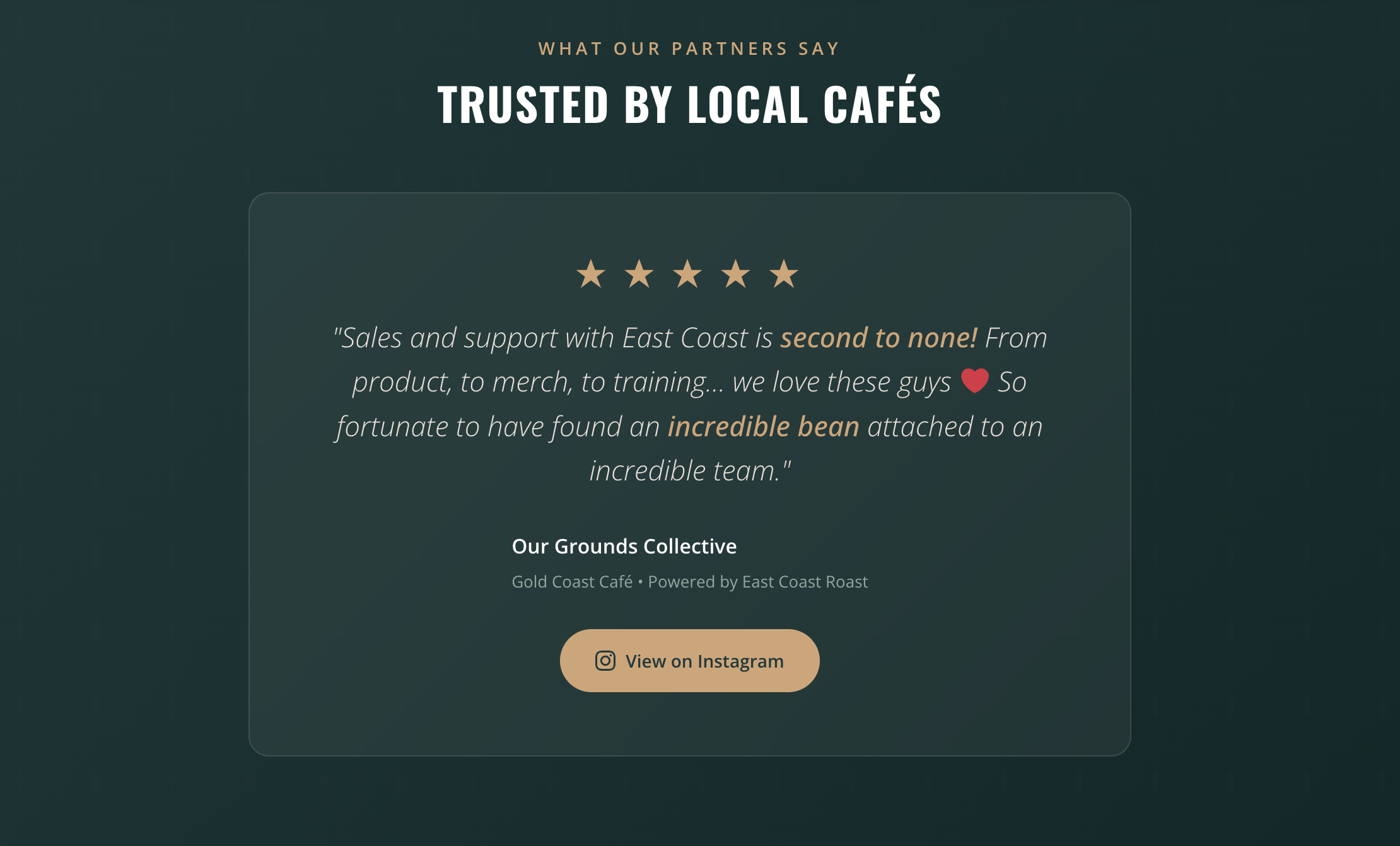
And the best part? I only even thought of it because he suggested it when he reviewed my site days earlier.
7. Building a CMS for Asset Shark (With Replit)
This one blew my mind because it showed Viktor working with another AI tool.
I have a SaaS app called Asset Shark that I built with Replit — an asset tracking tool for Australian small businesses. I wanted a blog on it for SEO content. Generally I would install WordPress for this but I built the landing page directly in Replit and I didn’t want the blog to be on a sub-domain. So I decided to do something crazy. Why not just build an ultra lightweight CMS just for this purpose. A few minute in Replit and we were done.
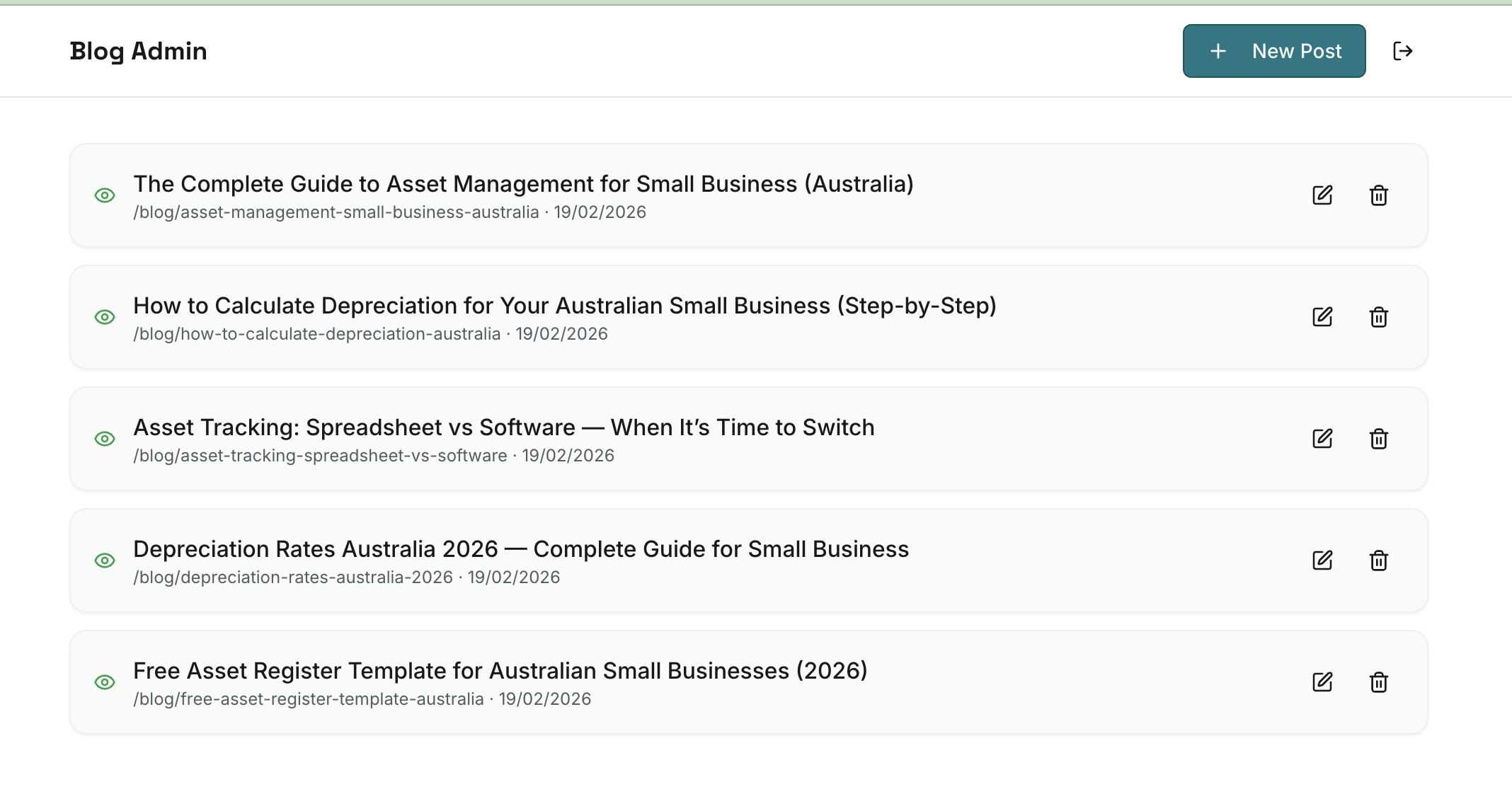
Once I’d built the CMS, I sent the login through to Viktor, he drafted me 5 blog posts with images, SEO optimized, instantly live via the new instant Asset Shark blog.
Related: The Complete Guide to Asset Management for Small Business (Australia)
Viktor couldn’t build the CMS directly (it’s a Replit-hosted app), but he did something better. He gave me the exact prompt to paste into Replit Agent to build a lightweight blog CMS with an admin panel, markdown editor, and API.
I also asked Viktor to review the new CMS from an SEO point of view and he identified a few things that needed adding (static meta tags, missing robots.txt, incomplete sitemap). He even wrote the exact fix prompt for Replit. Once that was deployed, all 5 blog posts had proper dynamic titles, descriptions, and sitemap entries — ready for Google. This was all in the space of about 30 minutes.
8. The Marketing Playbook
I was skimming Twitter earlier in the week and I saw a tweet about a marketer who had put his Claude marketing skills on Github. I couldn’t even remember the name of the person. So sent Viktor the vaguest of all prompts:
“I’ve heard there is a Github filled with marketing skills for Claude, can you find it and read the files and give me ideas on how we can implement these in my businesses my personal brand as well as Asset Shark and East Coast Roast. I also have Vibe Apps that I’m going to launch where I am going to offer app building services for other people. I’d like to have a bit of a recurring process for all brands with ideas I can execute quickly.”
He found the repo, read through all 40+ marketing skill files, and produced a full Marketing Skills Implementation Playbook as a PDF — mapping specific skills to each brand, with a suggested weekly workflow:
- Monday: Pillar content creation
- Tuesday: Repurpose and distribute
- Wednesday: Outreach and community
- Thursday: Optimize and convert
- Friday: Review and plan
He even set up a daily 8am marketing check-in reminder to keep things moving. The PDF is linked below if you want to see the full playbook.
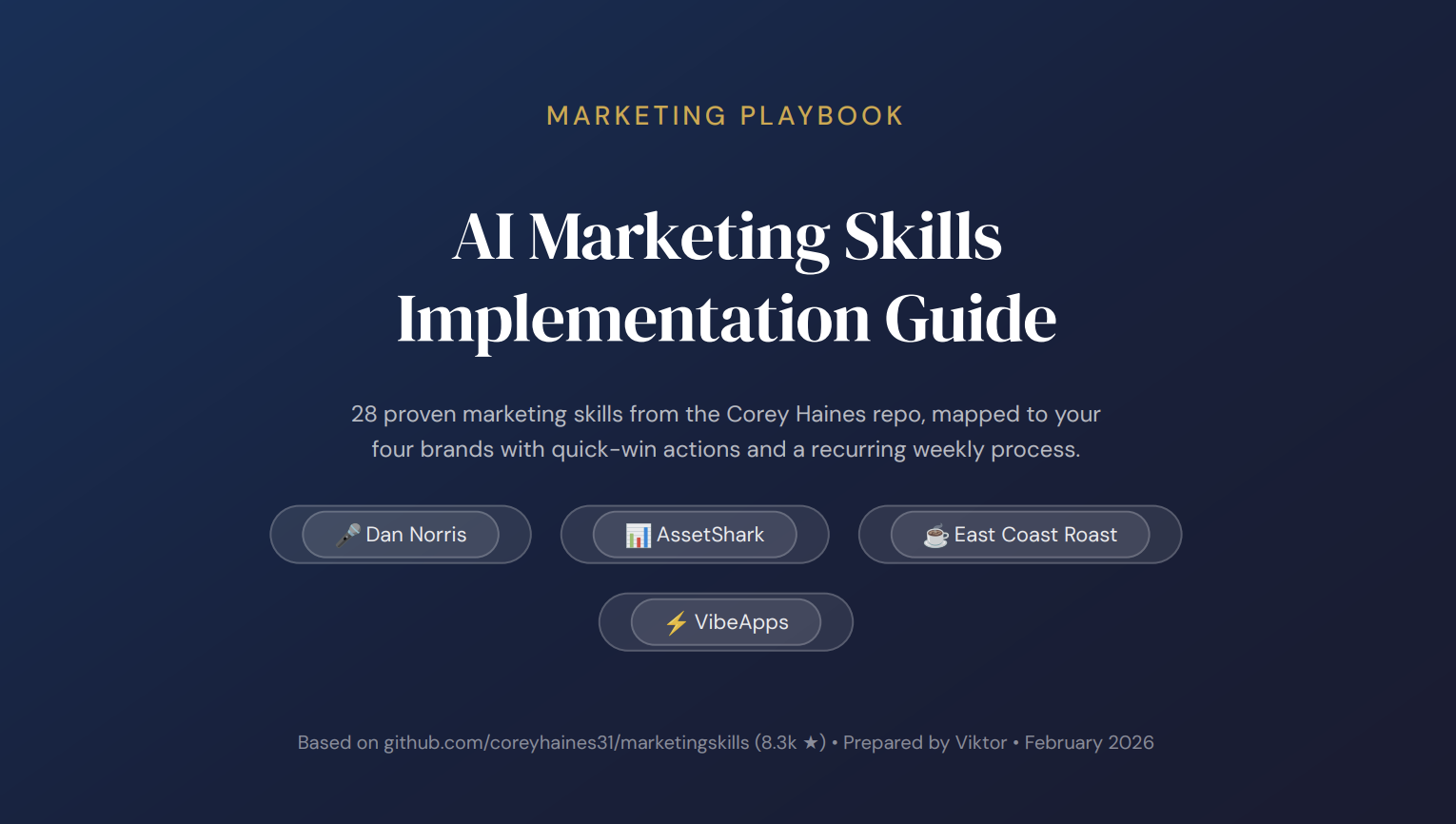
📄 Download: Marketing Skills Implementation Playbook (PDF)
Honestly one of the best things is just having someone to work with again on this stuff. Working by yourself is hard and I’ve done it for a lot of my life when it comes to marketing stuff. This is like getting an employee again to bounce ideas off, remind you of jobs and execute the mundane work. It’s awesome.
9. Business Strategy — Delivered as Audio
I asked Viktor a pretty open-ended question: “Learn as much as you can about me and give me some advice on what business areas to improve.”
He went away, researched my websites, books, businesses, blog posts — everything public — and came back with a detailed breakdown of my unfair advantages and six strategies ranked by speed to revenue. It was genuinely good advice, tailored to my actual situation, not generic side-hustle stuff.
But it was long so I asked him to turn it into audio so I could listen to it. A few minutes later I had a 20-minute audio file with an Australian voice reading the whole thing. I gave him some corrections (one of my businesses had actually been sold) and he regenerated an updated version.
That blew my mind a little bit.
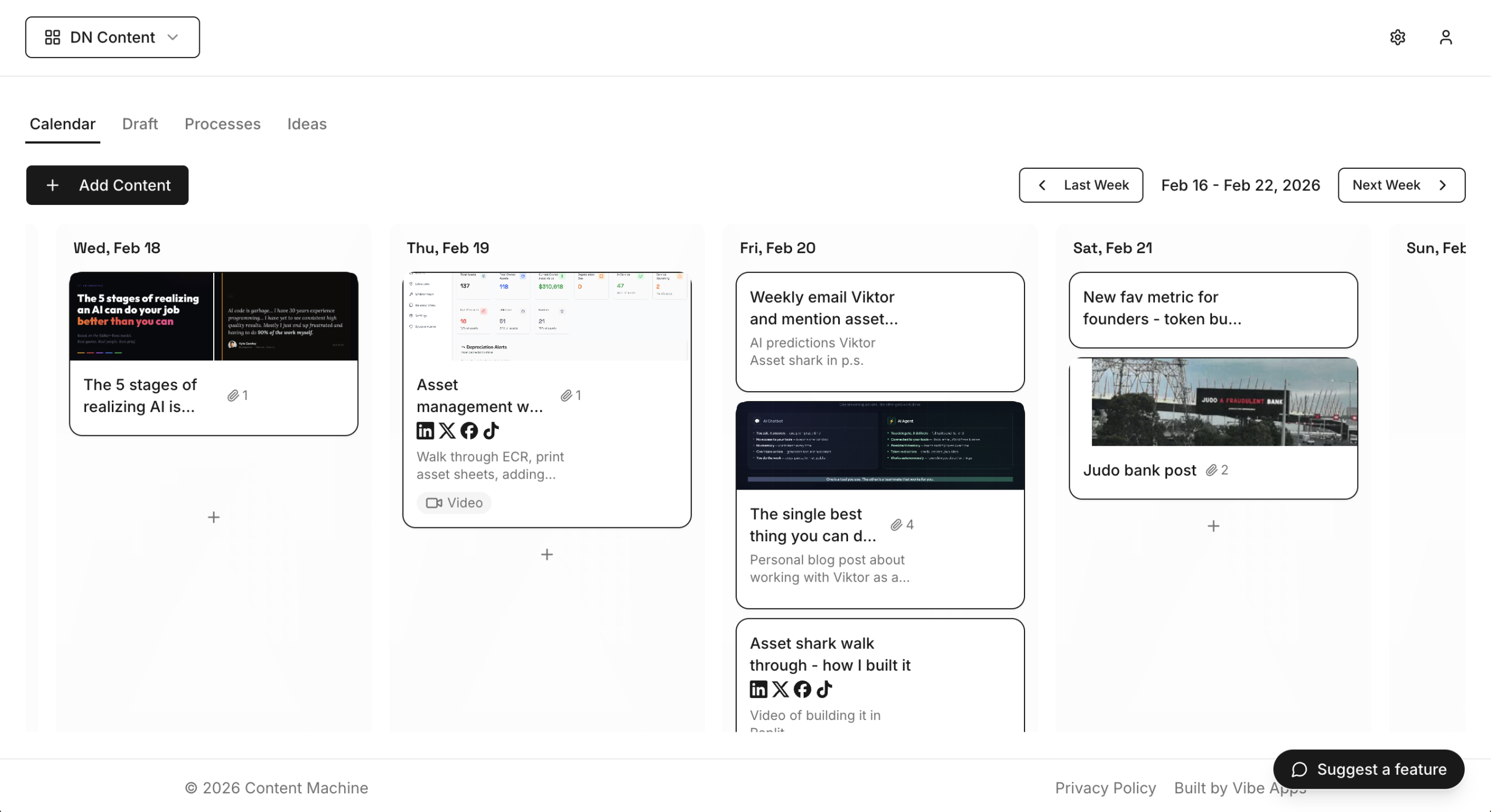
10. Content Machine Integration
I have a custom content calendar app I built called Content Machine. Because Viktor was so good at generating content ideas and creating the copy, I asked Replit to build an API into the app for me. It did it within minutes and then I connected Viktor to it. Now when he gives me good content ideas and creates content, I can tell him to send it directly to my calendar in Content Machine.
What Surprised Me
Other than everything blowing my mind, a few things stood out in particular:
He actually does the work. This isn’t “here’s a suggestion, go do it yourself.” Viktor writes the code, runs the scripts, uploads the files, connects the APIs, and delivers finished output. When something doesn’t work, he debugs it and tries again.
He remembers everything. Viktor saves what he learns as “skills” — reusable knowledge files he reads before starting any task. So the second time I ask him to push something to Content Machine, he already knows the API key, the board ID, the endpoint format. Last week I wrote about using Claude Cowork to help with my bookkeeping and detailed some of the frustrations. Having a memory really changes the game, and Viktor remembers everything.
Related: How to replace your bookkeeper with AI
He’s proactive. When I asked for blog posts, he also set up a weekly Tuesday reminder to nudge me about publishing and emailing my list. When he reviewed my site, he flagged the missing testimonials — which led to the Instagram testimonial being added days later. I didn’t ask for those things — he just figured they’d be helpful.
He works with my actual tools. Not in some separate AI sandbox. He logs into my WordPress, connects to my Mailchimp, pushes to my content calendar, accesses my server via cPanel. The work happens where my work already lives.
He works with other AI tools. The Asset Shark CMS build was Viktor collaborating with Replit Agent — orchestrating what I build in Replit and then handling the content, images, and publishing himself. It’s AI tools working together.
He doesn’t take up resources on my computer. He just goes off and works, while I get back to doing whatever I was doing. This is a game changer in compared to Claude Cowork which uses my computer and is more of a direct assistant where we work together. Viktor is autonomous and only comes back to me when he gets stuck.
Tokens
Because I’m always honest about everything I write, I can’t cover this topic without talking about costs. The free trial is very generous but I burnt through 40,000 very quickly. Now that I have to pay, I’m much more conscious about how much all of this costs.
I think the new favourite metric for founders is going to be token burn rate per day. Again like Cowork, if you compare this to other software systems it will be the most expensive system I’ve ever paid for (realistically probably $300-$400 a month just doing what I’m doing now with it). But if you compare it to a VA or an employee it’s not even a conversation. And I think that’s the fair comparison. This is doing what an employee would do and it’s doing it much much faster, better and much cheaper.
The Bottom Line
If you’re overwhelmed and confused about AI, I totally understand. There’s a reason I built that “5 Stages of AI Grief” infographic — most people are somewhere on that journey.
But here’s what I’d say: stop trying to figure out AI in the abstract. Start using it on real work.
Viktor isn’t replacing my team or making me obsolete. He’s like having a tireless junior coworker who can write, code, design, research, and connect everything together — while I focus on the decisions and the direction.
In one week, we produced more content and marketing infrastructure than I would have in a month working alone. And we’re just getting started.
If you want to try Viktor yourself, check out getviktor.com.
I’ll keep sharing what we build together. Every week in my email I’ll update you on what we’ve been working on — sign up here if you want to follow along.
Weekly email on AI, Vibe Coding and Entrepreneurship
Join thousands of smart entrepreneurs following what I’m building, learning, and thinking about — no spam, no affiliate links, no BS.

- Vibe Coding Costs: How much I paid to build 3 Production SaaS Apps - March 2, 2026
- AI Coworker vs AI Agent — What’s the Difference and Which Should You Use? - February 26, 2026
- Overwhelmed By AI? Sign Up for Viktor Now. - February 20, 2026