How I Built a Content Idea App (Content Machine) as a Non-Technical Person Using AI
Sometime last year I got pretty excited about Vibe Coding and started playing around with a few tools, most notably Replit. I loved it overall but it was just not quite there in terms of enabling a (mostly) non technical person like me to fully build an app from scratch in an efficient way without the help of a programmer. That said, I was able to build an Asset Manager that we used in our business (and continue to use), with a lot of back and forth with the AI and a fair amount of hair pulling.
Related: You’re absolutely right: Lessons learned vibe coding our asset management system
Over the Christmas break I had some time off and kept following what was happening, and couldn’t resist digging in a bit more. The tools had turned a huge corner and I decided that in January I would spend the month going all in on Vibe Coding, doing more content about it, and ultimately releasing some of the apps I’d been working on.
By January I had launched a live app online and in the Apple App store, completely vibe coded by me, without looking at a single line of code, without the help of a developer. This article runs through everything.
Introducing Content Machine
Despite having the asset app already done (ish), as well as another rostering app we use for our team, I decided to build a brand new app. For one, I wanted to see what was possible in a few weeks completely from scratch, I also wanted a mobile app (which is a much bigger challenge than a web app), plus I had the domain contentmachine.com and thought it would be interesting to start using it as a bit of a test run.
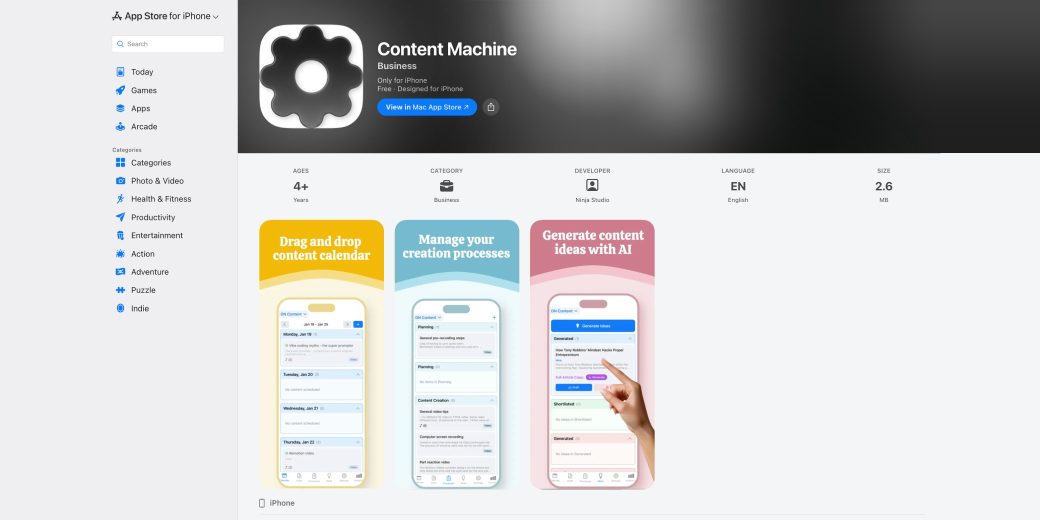
The app is now live, you can use it on the web at https://contentmachine.com/ or here via the Apple app store.
The idea was to build something like Trello but specifically for content idea management. Here’s a quick demo, so you can see it in action.

Historically building something like this would be a hell of a lot of work, and you would have had to know programming very well. It’s not quite as simple as you’d think. In the past, I’ve spent months and months and tens of thousands of dollars on apps less complicated than this.
For just this web version, I needed a web application with user authentication, database storage, a drag-and-drop interfaces, AI-powered content generation, multi-user support and much more.
Vibe Coding with Replit
The entire web version was built with Replit which is an amazing tool. Here’s what Replt looks like. On the left you have the AI agent that you tell what to do, and on the right you have the preview of the app.

This is not some kind of drag and drop toy, this is writing pages and pages of code to build whatever you want. You can see the files, view and edit the code yourself, download the code. It’s basically exactly what a great developer would build for you but in many ways a lot better. Replit builds the app for you, and previews it for you, and hosts it for you, and has inbuilt integrations for all sorts of stuff to make the whole thing way faster and easier.
There’s lots you need to know when building an app available to the public, but you have access to the AI to ask questions, so you are not alone. I love testing changes myself so I did a lot of asking it what to build and then testing the change. But Replit even has an inbuilt feature where it can bring up it’s own browser and start testing the changes itself, which is kinda scary and cool.
I was able to build a working version that I could use myself in 2 days. Building a version that I was confident enough releasing to the public took quite a bit longer, particularly because I wanted it to come with a mobile app.
Building a mobile app using Claude Code and X Code
If you have ever tried to build software, you will know that building something for the web is one thing, building a native app for an iPhone is something entirely different. Apple are very strict with what they let into the App Store, there’s really only 3 ways to build an app that Apple is likely to let into the store:
- Use their X Code development platform which is extremely complicated and basically impossible for a non technical person to learn, even very difficult for an average web developer to learn.
- Use some kind of framework that simplifies some of the process and does a lot of the UI work in a style much more like we do on the web (Expo is a good solution)
- Use a drag and drop app builder and just hope Apple don’t notice the clunkiness and non-native look and feel (I did this during Covid and got an app in the store when the rules were a bit looser).
With the explosion of AI coding tools, this has all changed. There are now 2 awesome options and both are great for non technical people.
- Build it locally in X Code but use Claude Code in the terminal to write all the code for you and essentially coach you through all off the laborious steps with Apple. This is what I did for this app.
- Replit now have their own mobile app builder that uses Expo and bypasses a lot of the Apple fluff. This wasn’t available when I built Content Machine but I’ve used it since and it’s awesome and a million times easier than option 1.
The day of writing Open AI also just released Codex which looks like another awesome option. And then finally the day after I wrote this (but just before I published it), Claude just announced a direct X Code integration which looks even better again. Damn it’s hard to keep up!
The way the X Code / Claude option works is you have the whole application setup on your local Mac using all of Apple’s standard processes, and you have Claude in the terminal writing the code for you. So Claude writes the code but you still have to do all the Apple stuff, updating versions, changing names, adding images, creating builds, uploading to the App Store, using Testflight, going through the whole App Store review process etc etc.
This is what the setup looks like, you have X Code as the main window, a simular to test the app on, and the Terminal window open running Claude to help you change the code.

It’s kinda scary and honestly a bit much for a non technical person. I know enough to have done some of this stuff before with the app we had during Covid, and with the help of Claude AI locally I was able to figure it out.
It’s also very slow. Any time you change anything you have to build it again either in simulator or by connecting your phone. Then if you want to have it on a physical device that’s not plugged into your computer (i.e. you want the app on your phone when you leave home), you have to do a build for TestFlight and set all of that up. It’s very time consuming, the version that’s in the App Store now is build number 37! That means hours and hours of time just spent doing builds, uploading to App Store connect, filling in information, downloading onto the device and testing.
But it was a fun challenge, and pretty cool to have a fully native iPhone app in the app store.

I’ve since built another app using Replit’s mobile app builder and it’s a million times easier. Because it’s built on Expo, you can immediately test most changes on your phone just by shaking it to re-load and you see the changes instantly. That feature alone would have saved me days and days.
The mobile app now includes the full onboarding flow, content calendar views, the AI idea generator, and settings management – all communicating with the same backend that powers the web app.
I use both every day but probably use the mobile app more just because I always have my phone.
It kind of blows my mind that I was able to build this app without a developer. I’ve never seen progress like I’ve seen in the last 3-4 months on something. It’s truly staggering. I can’t even begin to think what the next few weeks, months and years will bring.
In any case, I’ve done my best here to end with a few tips for people who are interested in using these tools.
Lessons for Fellow Vibe Coders
Ignore the Cope – Every time I put a post on social media about this, every developer comes out of the woodwork to troll me and give me every reason in the world why it’s not going to work. It’s all bullshit, they are scared, trust me. The best developers in the world are now using these tools, they are way better than any developer. They are all converging on the same view now which is – they will never write code again.
Use Replit – I’m obviously completely blown away by Replit, I’m not an affiliate and don’t have any relationship with them, it’s just an unbelievable tool. Now they have the awesome mobile builder, I can’t think of a good reason to use anything else.
There are costs – Vibe coding is not free, the Replit plan costs money and tokens on any of the app builders can add up pretty quickly. It’s absolutely nothing compared to paying a developer, but it’s definitely not free.
Start with something reasonably simple – If you haven’t built much software before, you might be surprised that even something that feels simple, is actually very involved. The simpler you can make the first project the better. I chose starting with this app instead of my others, partly because it was a lot simpler. But even for a simple drag and drop idea manager, there’s a fair amount of complexity to it – even just the web version alone is 15,000+ lines of code. Try to limit the scope, and try to keep scope creep under control (always hard).
You do need to know the basics – I’ve been involved in building web apps since the early 2000’s. I even built my own back in the day (with great difficulty). The point is, I’m not coming to this completely from scratch. You do have to have some understanding of what is on the web and what is on the database, what is on the device and what is online, what a domain is, what are DNS records etc. I reckon the best way to learn that stuff these days is just to go into plan mode at the start and ask the AI a bunch of questions to help you get the basics down.
Start with a reasonably full picture – I built all 3 apps by starting completely from scratch, with zero planning and initially just for me. Ideally you wouldn’t do this. It’s worth having some idea of what you are building and giving Replit that information up front. Even things you might think are basic like the fact that ultimately you want multiple users using it, or multiple companies using it, or what platforms you want it on. All of that is worth thinking about at least briefly before you start.
Will people need apps? – I feel like I’m most likely doing this as a hobby. I think with how fast this is going and how easy it’s becoming to build software, this whole space is going to be commoditised and apps will be close to free. So I’m not sure I’d necessarily recommend everyone go out and build software hoping they can sell heaps of subscriptions. But at least for now, I think it’s a decent skill to have, and it’s certainly addictive and very fun.
Don’t forget about security – If you are building anything for the web you need to think about security, particularly if it’s available for anyone in the public to access. This is not some kind of kids tool. What you are building using these tools is technically on par with any web based system built by world class developers. Again the AI can be your friend here, but they won’t know what to help you with unless you ask for help and continue to be focused on security.
I hope this article was useful, if you want to check out Content Machine, have a look at https://contentmachine.com/ or in the Apple App Store here.
If you are interested in what I’m doing, jump on my weekly email, or follow me on Instagram or LinkedIn.
Weekly email on AI, Vibe Coding and Entrepreneurship
Join thousands of smart entrepreneurs following what I’m building, learning, and thinking about — no spam, no affiliate links, no BS.

- Vibe Coding Costs: How much I paid to build 3 Production SaaS Apps - March 2, 2026
- AI Coworker vs AI Agent — What’s the Difference and Which Should You Use? - February 26, 2026
- Overwhelmed By AI? Sign Up for Viktor Now. - February 20, 2026